There are many ways to increase your internet speed out of which DNS Hack is one.
when we have slow internet connection we will surely blame our internet service provider. This not actually happens all times rather there is problem with our domain.
What is DNS?
DNS means Domain Name System (Service/Server) it converts your domain names into IP addresses.
The domain names are usually alphabetic for us to remember easily, but in actuality the Internet works on IP addresses. The DNS converts the domain name into its corresponding IP address, each time it is used as such. The DNS has a network of its own i.e. one DNS server can ask other DNS servers about translating a specific domain name to its corresponding IP address till it gets the correct result.
example: consider Domain name www.google.com could correspond to IP adress 74.125.224.72
How To Speed Up Web Browsing Using DNS Hack?
Step 1:
To increase internet speed using OpenDNS, first open Control panel.
Step 2:
Go to Network and Internet options.

Step 3:
Now click on Network and Sharing Center.
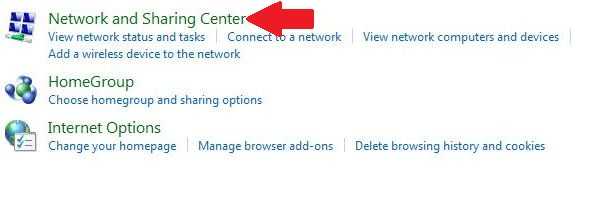
Step 4:
Click on your Internet Connection and then click on Properties.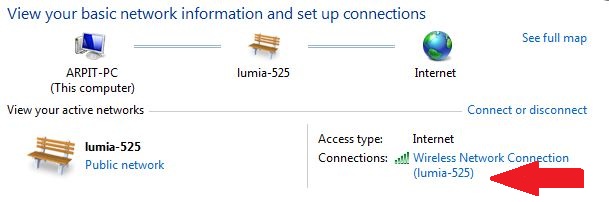
Step 5:
Highlight the Internet Protocol Version 4 (TCP/IPv4) and click on Properties.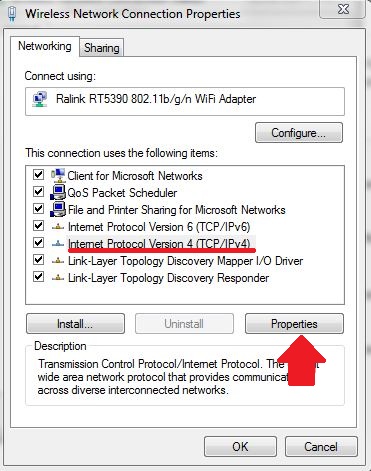
Step 6:
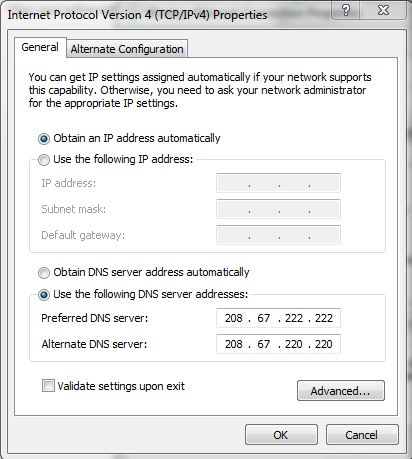
Now choose the following DNS server addresses to get a faster internet speed:
Preferred DNS server: 208.67.222.222
Alternate DNS server: 208.67.220.220
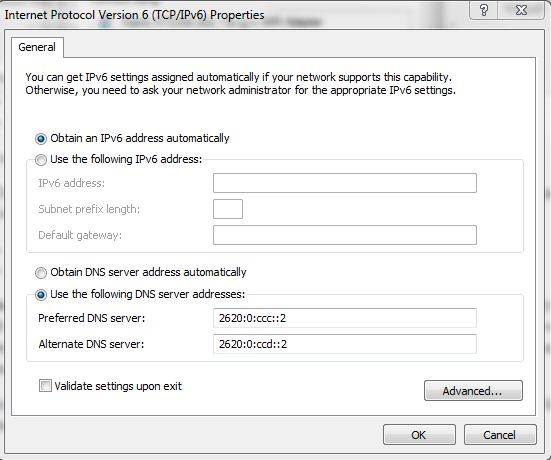
To Configure IPv6:
Highlight the Internet Protocol Version 6 (TCP/IPv6) and click on Properties, and choose the following DNS server addresses:
Preferred DNS server: 2620:0:ccc::2
Alternate DNS server: 2620:0:ccd::2


0 comments:
Post a Comment